
The default outcome of most installations is that cameras end up on the office network with the laptops, the printers, and the accounting server. It happens for an ordinary reason: the switch is there, the port is spare, and the camera works. It also means a device with factory-default credentials and a consumer-grade web server is now a peer of everything your business runs on.
Segmentation does not fix a bad camera. It bounds the damage: it decides what a camera can reach, who can reach it, and what evidence you have afterwards.
Start from what the traffic actually is
Camera networks are unusually predictable, and that predictability is what makes them easy to isolate well:
- Traffic is one-directional and constant. Video streams flow from camera to recorder, continuously, at a steady bitrate. There is very little camera-to-camera traffic and almost no reason for a camera to originate a connection to anything but the recorder and the time server.
- The address list is fixed. You know every device on this network on the day you build it. That makes an allowlist practical rather than aspirational.
- Bandwidth is the constraint. A dozen cameras at high resolution and 15 frames per second will saturate a gigabit uplink before they saturate anything else. The design question is usually throughput, not compute.
- The device lifecycle is long. Ten years is normal. Whatever you design, you will be living with it through several generations of camera firmware.
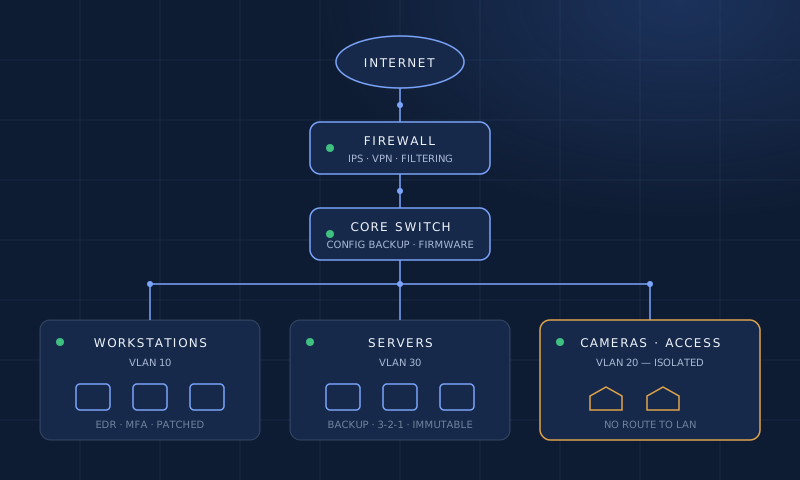
The segmentation itself
A dedicated VLAN for cameras, and a second for the recording server, is the starting point rather than the finish. What matters is the policy attached to it.
- Put cameras on their own VLAN with a dedicated address range, and record the range in your documentation. Do not reuse the office DHCP scope.
- Hand out addresses by reservation, not lease. Cameras should get a fixed address tied to their MAC, or a static one. A camera that changes address overnight is a recorder that loses a stream overnight.
- Allow only the flows you named. Camera to recorder, and camera to your internal time source. Nothing else, in either direction. Where the switch supports it, port security limiting each access port to a single learned MAC address stops someone unplugging a camera and plugging in a laptop.
- Keep the recorder out of the camera VLAN. The recorder needs one leg in the camera network and one in the network your staff use. Two interfaces, routed deliberately, is a design. Two interfaces routed carelessly is a bridge, and a bridge hands a compromised camera the run of the office network.
- Never expose the recorder to the internet. If people need to view footage remotely, they reach it over a VPN, or through a client that authenticates against your identity provider. A forwarded port to a recorder's web interface is the most common way surveillance systems are compromised, and it is entirely avoidable.
- Give cameras a time source. A camera whose clock has drifted makes footage that cannot be correlated with a badge event, a ticket, or a payroll record. Point them at internal NTP, and point anything on the camera VLAN at internal NTP only.
Test it before you trust it: from a laptop on the office network, try to reach a camera's web interface. If it answers, your segmentation is a diagram rather than a control. Then try the reverse — from the camera network, reach the internet. Neither should succeed.
Where access control belongs
Door controllers and readers are the same category of device as a camera: embedded, long-lived, and reachable over the network. Put them on the camera VLAN or a third of their own, and treat badge events the way you treat video — as records to be retained, protected, and produced on request. A badge log that anyone on the office network can read is a personnel record with weak protection, and it is the first thing a compliance reviewer asks about.
Retention and record-keeping
Decide how long footage and access events are kept, write it down, and configure the system to match. Retention is usually set by what your insurer, your contracts, and your legal counsel require — not by how much storage the recorder happens to have. When retention is configured deliberately, the recorder is also continuous evidence that the control operates, which is worth something at audit time.
Two habits make the whole system more useful. Keep a current record of what is installed where, so an incident review does not begin with a physical survey of the building. And review camera and controller firmware on a schedule, on the same list as everything else you patch — the alternative is discovering the schedule when a vendor advisory lands.